
WhatsApp expense tracker: log expenses by message
In this article
- How a WhatsApp expense tracker actually works
- Build your own, or use a finished app?
- What does a WhatsApp expense bot cost to run?
- Voice notes and receipt photos
- Is it safe to send your spending to a WhatsApp bot?
- On Android, you don’t even have to send the message
- When this isn’t for you
- What you actually get after the first message
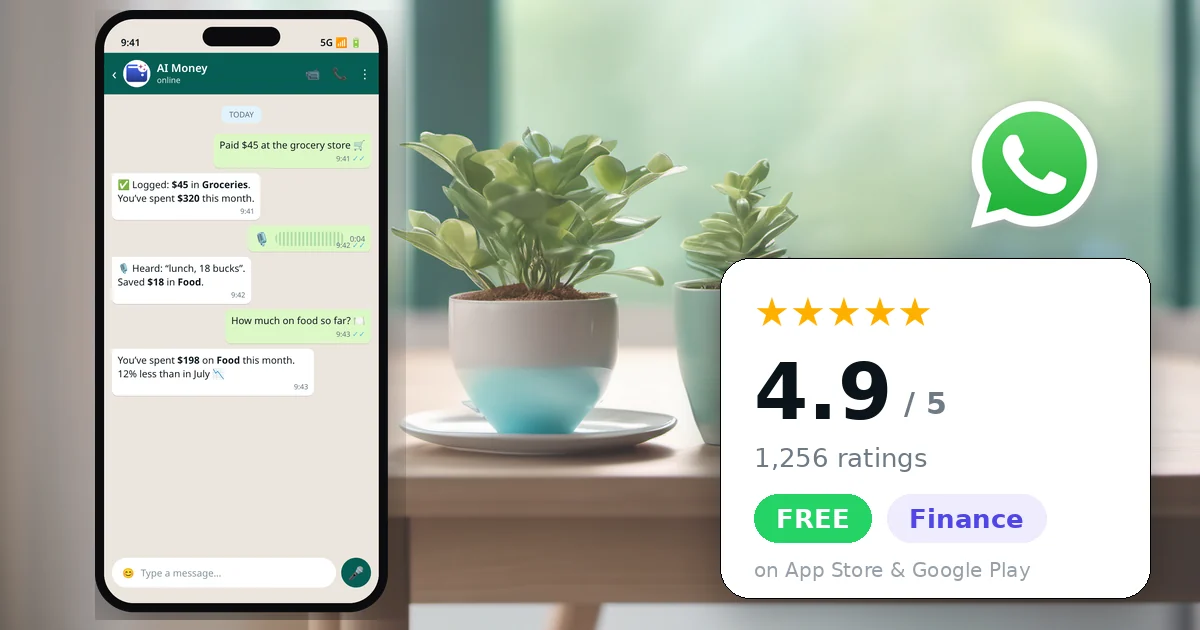
A WhatsApp expense tracker lets you log a purchase by sending a message instead of opening an app. You have two real choices: build your own with an automation tool, a spreadsheet and an AI key, or use a finished app that already has a WhatsApp bot. AI Money is the second kind: text it “lunch 12”, send a voice note, or photograph the receipt, and the expense is logged and categorized. The free plan allows 2 WhatsApp entries per day, voice notes up to 30 seconds and 10 images per day.
Almost nobody abandons expense tracking because they lack discipline. They abandon it because of friction. Logging a $4 coffee means unlocking your phone, finding the app, waiting for it to load, tapping plus, picking a category and typing an amount. Six steps for four dollars. By day three you stop.
Messaging flips that around. Instead of pulling you into an app, it puts the logging where you already are. And unlike a budgeting app you have to remember to open, WhatsApp is already open.
Disclosure: this article is published by AI Money, which is one of the options discussed. That’s why there is a full section on when building your own is the better call, a section on when this approach isn’t right for you at all, and why third-party details were checked on official documentation on August 14, 2026.
How a WhatsApp expense tracker actually works
You link your number once. From then on you write to a bot the way you’d write to a friend, and a language model reads the message, pulls out the amount, the date and the category, and creates the transaction.
There’s no required syntax. “lunch 12”, “spent 12 on lunch” and “$12 lunch today” all land in the same place. If you mention a date, it uses it; if you don’t, it uses today in your timezone.
The interesting difference between options isn’t the chat. It’s what sits behind it.
Build your own, or use a finished app?
Search for this and most of what you’ll find is tutorials: wire up an automation platform, connect the WhatsApp Business API, add an AI key, write to Google Sheets. Those tutorials are real and they work. Here’s the honest comparison.
| Build your own | Finished app with a bot | |
|---|---|---|
| Setup | An afternoon, more if it’s your first time with the WhatsApp Business API | A couple of minutes |
| Cost | Automation tool (free self-hosted tiers exist) plus pay-per-use AI | Free tier, or a subscription |
| Control | Total. Your data, your schema, your rules | Whatever the app exposes |
| What you get after logging | Rows in a spreadsheet. Charts are your job | Accounts, budgets, savings goals, debts, reports, export |
| When it breaks | You are the support team | Someone else’s problem |
Build it yourself if you enjoy building things. If you already run automations, the marginal effort is small and you end up with exactly the schema you want. That’s a genuinely good outcome and no app will match it for control.
Use a finished app if you want the result, not the project. The part tutorials skip is month six: credentials expire, the API changes, and when it breaks on a Tuesday night there’s nobody to email. You are the on-call engineer for your own grocery receipts.
What does a WhatsApp expense bot cost to run?
Less than most people assume on the messaging side, and more than they assume on the AI side. This is worth understanding whichever route you take.
Meta moved the WhatsApp Business Platform to per-message pricing on July 1, 2025. Crucially, charges apply to template messages a business sends on its own initiative. Replies inside an open customer service window, which is exactly what an expense bot does when you message it first, are not charged: the documentation states that “all non-template messages are free” within that window.
The cost of a WhatsApp expense bot is the AI, not the messaging. Replying to a message you sent is free under Meta’s rules. Transcribing your voice note, reading your receipt photo and interpreting your sentence are paid per use, every time. That’s why free tiers are capped in entries, audio length and images rather than in messages.
So when a service offers unlimited AI-powered logging for free forever, it’s either subsidizing growth or making money another way. Worth asking which.
Voice notes and receipt photos
Text is the obvious mode, but it’s rarely the fastest. A voice note is what you want while driving or carrying groceries: you talk, the audio gets transcribed, and it becomes a transaction. In AI Money the limit is 30 seconds, which is enough to dictate two or three expenses in one go.
The receipt photo handles what nobody wants to type: the twenty-item grocery run, the repair invoice, the restaurant bill. Send the image and a vision model pulls the total and suggests a category. The free plan allows 10 images per day.
When the AI gets the category wrong
It will, like any automatic classifier. What matters is that fixing it doesn’t send you back into an app: reply to that transaction’s message in the chat and say what to change, or delete it by replying. Anything else can wait until you open the app.
Is it safe to send your spending to a WhatsApp bot?
It depends on what leaves your phone, and the honest thing is to spell it out rather than write “your data is secure” and move on.
With AI Money: the message text, the audio and the receipt photo do leave your device, because a language model on the server interprets them. Your transaction ledger doesn’t; it lives on the phone. And there is no bank connection involved, so there is no banking credential that could leak. The app never asks for one.
That’s the real trade against the other model. Apps that link to your bank via an aggregator are more automatic, and in exchange the provider can see your account activity. Neither answer is right for everyone, but you should know which one you’re picking.
Linking is designed around the same principle: you request a code inside the app and send that code to the bot from your WhatsApp. You prove the number is yours without typing your phone number into a web form.
On Android, you don’t even have to send the message
There’s a shortcut past the “I can’t be bothered to message it” problem. On Android, with your permission, the app can read your bank’s SMS alerts and payment notifications and turn them into transactions with no action from you.
On iPhone the closest equivalent is a Shortcut for Apple Pay purchases. It isn’t the same thing, and it’s fair to say so: iOS doesn’t let one app read another app’s messages.
When this isn’t for you
If you want transactions to appear without you sending anything. AI Money doesn’t connect to banks, and that’s a design decision rather than a missing feature. If automatic import is your priority, a bank-linked app will serve you better, and you accept the access that comes with it.
If you’re technical and enjoy owning your stack. Build it. You’ll get more control than any app can offer, and the tutorials are good.
If you need to split bills with friends. That’s a different category of app. AI Money has a shared pot for couples, but it doesn’t track who owes whom.
What you actually get after the first message
The chat isn’t the point; it’s the door. What makes it worth doing is what assembles itself while you send messages. Within a few weeks the month is categorized without you ever sitting down to categorize it: where the money went, what’s in each account, which budgets you’re blowing through, and how much you’ve set aside in savings goals. When you need to hand something to an accountant, you export to PDF or CSV.
If you want to see how it compares to the bank-linked apps, there’s a full comparison of budgeting apps with verified prices. If you’d rather just start, the app is available here and linking WhatsApp takes a couple of minutes in Settings.
Yes. AI Money logs expenses sent by WhatsApp as text, voice notes or receipt photos, and the entry lands in a full app with accounts, budgets, savings goals and debts. You can also build your own with an automation platform, the WhatsApp Business API, an AI key and a spreadsheet, which gives you more control but makes you responsible for maintaining it.
AI Money’s free plan allows 2 WhatsApp entries per day, voice notes up to 30 seconds and 10 images per day, with no card required, and the rest of the app is free forever. Pro removes the WhatsApp limit for $3.99 per month or $32.99 per year. If you build your own, the messaging replies are free under Meta’s rules but the AI processing is billed per use.
Meta moved to per-message pricing on July 1, 2025, and charges apply to template messages a business initiates. Non-template replies sent inside an open customer service window are free, and that window is exactly what opens when you message a bot first. So the recurring cost of an expense bot comes from AI processing, not from WhatsApp itself.
The text, audio and photos you send do leave your phone, because a model on the server interprets them. With AI Money the transaction ledger itself stays on the device, and because the app does not link to your bank there is no banking credential involved. Services that link to your accounts through an aggregator are more automatic but can see your account activity.
Yes. Voice notes up to 30 seconds are transcribed and turned into transactions, which is enough to dictate two or three expenses at once. Receipt photos are read by a vision model that extracts the total and suggests a category, with a limit of 10 images per day on the free plan.
Build it if you enjoy the process and want full control over your data and schema, since the tutorials work and self-hosted automation tiers exist. Use a finished app if you want the outcome rather than the project: the maintenance is the part tutorials skip, and a bot on its own gives you rows in a spreadsheet rather than budgets, goals and reports.
 AI Money
AI expense tracking
AI Money
AI expense tracking
Start free, in under a minute
- Free forever
- No card
- Your data stays on your device
