
The #1 Personal Finance App & FREE AI Expenses Tracker
Stop wondering where your money goes. AI Money is the ultimate budgeting app and expense tracker that automates your life. Log expenses via WhatsApp, voice, or photo with our elite AI finance assistant.
for Finance”
Finally, an AI Expense Tracker App That Actually Saves You Time.
Manual logging is dead. With AI Money, you have the flexibility to manage your budget tracker however you want
A multi-currency app with support for 50+ currencies 🌍💱
WhatsApp Expense Tracker Bot — Text or Voice Note
Send a text, a voice note or a photo of the receipt to Denis on WhatsApp and it logs the expense for you.
Automatic Expense Tracking from Bank SMS & Apple Pay
With Pro, it reads the bank alerts you already get on Android, or your Apple Pay purchases on iPhone.
Budget App for Couples — Shared Pot, Separate Accounts
A shared pot you both fund and see — your personal accounts, balances and transactions stay private.
Debt Payoff Tracker for Loans & Credit Cards
Loans, credit cards and instalments in one place, with an estimated payoff date for each one.
Track Cash, Cards & Any Bank — No Bank Linking
Add the accounts you already have. No bank login, no Plaid and no password to hand over, ever.
AI Receipt Scanner for Expenses — Snap & Log
Snap a photo of any receipt and the AI pulls out the amount, merchant and date, then files it.
Monthly Budget Planner with Category Limits
Set a monthly limit per category and get alerted before you overspend. Unlimited budgets, free.
Savings Goals Tracker & Money Pockets
Split any account into pockets and watch every goal grow with real progress you can see.
Subscription Tracker Without a Bank Login
Spots recurring charges — Netflix, Spotify, the gym — for you to confirm, then totals them monthly.
AI Voice Expense Tracker — Just Speak It
Say what you spent and Denis turns it into a categorized transaction. No typing, no forms.
Multi-Currency Expense Tracker (50+ Currencies)
Accounts in any currency, exchange rates updated daily, and one switch converts every screen.
Spending Reports & Charts — Where Your Money Goes
Build your own dashboard of charts and see exactly where every month went.
AI Financial Assistant & Money Coach
Ask Denis where your money went this month and get the answer from your own transactions.
Offline Expense Tracker with Optional Cloud Backup
Your ledger works with no connection. With Pro, switch phones and restore it all in one tap.

Denis is more than a bot it gives you real answers. Powered by advanced reasoning models, she analyzes your spending and goals to build a roadmap to wealth.
- Strategic Planning: Get custom investment plans and emergency fund targets.
- Smart Analysis: Understand your spending habits and savings potential in seconds.
- Human-like Reasoning: The highest-valued smart finance assistant technology for complex financial questions.
Experience the easiest expense tracker app on the market. AI Money automates your financial logging so you can focus on living.
- WhatsApp & Voice: Log expenses instantly via WhatsApp or voice-to-text.
- Smart Categorization: Our AI recognizes every merchant and category with 99% accuracy.
- Zero Friction: A money tracker that finally works on autopilot.
Transform raw numbers into wealth. We are more than a budgeting app; we are your financial command center for data-driven decisions.
- Budget Tracker: Set goals and track spending habits with intuitive visual reports.
- Wealth Growth: Know exactly where to cut back to reach your long-term goals faster.
- Personalized Reports: Custom charts designed for your unique financial journey.
Discover the most flexible personal finance app available today. Whether you want 100% automation or precise manual control, we adapt to you.
- Hybrid Logging: Toggle between AI-powered tracking and manual entry anytime.
- Multi-Device Sync: Your data is always ready on mobile, tablet, and across the web.
- Fully Customizable: Tailor your money tracker to fit your specific needs and categories.
AI Money works as a debt payoff app: track every loan, credit card and instalment plan in one place and see the real date you'll be debt-free.
- Every debt in one view: bank loans, credit cards, instalments and money you lent to someone else.
- A real payoff date: each payment updates how much you truly owe, not what the statement says months later.
- Payments that add up correctly: paying a debt moves money out of your account without inflating your monthly expenses.
Turn any account into a savings goals app. Split it into pockets — trip, emergency fund, new car — and fund them without opening a second bank account.
- Unlimited pockets: keep each goal separate inside the money you already have.
- Real progress, not guesses: every pocket is backed by actual transactions, so the number is always true.
- Estimated interest: add your account's rate and see roughly how much your savings could grow.
A shared expenses app for couples who keep separate accounts. Rent, groceries and the bills come out of one common pot you both fund, and everything else stays your own business. Included with Pro.
- Built for couples with separate accounts: the setup most people living together actually use — one shared pot for what you share, your own account for everything else.
- Household expenses, both of you in the loop: rent, groceries and utilities come out of the pot, and you can both see the balance, who contributed what, and who’s ahead.
- Your personal money stays private: only the pot’s balance and its movements are shared. The account a contribution came out of never leaves your phone.
A subscription tracker that never asks for your bank login. AI Money spots the charges that keep repeating — Netflix, Spotify, the gym — and you decide which ones are really subscriptions.
- Found in your own records: it reads the expenses already logged in the app, so there is nothing to connect and no password to hand over.
- Nothing is added behind your back: every subscription it spots waits for you to confirm it before it counts.
- Know what is coming: see what your subscriptions add up to each month and which one renews next.
A multi-currency expense tracker built for travellers, expats and remote workers. Hold accounts in different currencies and still see one clear balance.
- 50+ currencies: each account keeps its own, exactly like your real bank does.
- Live exchange rates: see everything converted into your main currency whenever you need the full picture.
- No mental maths abroad: log a payment in the local currency and it lands where it belongs.
The only WhatsApp expense tracker that understands you like a person. Send Denis a message, a voice note or a photo of a receipt and the transaction is logged.
- No app to open: log a coffee from the same chat list you already use every day.
- Text, voice or photo: whatever is fastest in that moment gets categorized automatically.
- It answers back: ask how much you spent this week and get the number in the chat.
Uber, today at 9:38.
Receipt read automatically.
An offline expense tracker for people who don't want their finances in someone else's database. Your ledger lives on your device unless you decide otherwise.
- 100% local storage: works with no connection and no account linking.
- No bank credentials, ever: we never ask you to connect your online banking.
- Cloud only if you want it: turn on backup to switch phones without losing a single expense.
Start as a free expense tracker app: unlimited manual transactions, categories and reports, with no trial countdown and no credit card.
- Free forever core: log your money, budget by category and see where it goes.
- Pro when you want automation: bank SMS, Apple Pay, Google Pay, WhatsApp and receipt scanning.
- No hostage data: your transactions stay yours whether you pay or not.
✓ Categories & budgets
✓ Reports and charts
✓ WhatsApp & voice logging
✓ Receipt scanner & cloud backup
Real Stories: Total Control & Savings
As an accountant, I finally ditched my Excel expense tracker
I was looking for a modern alternative to log future income and payments, and this money manager exceeded my expectations. As a professional, I prefer keeping my books here rather than on spreadsheets. Highly recommended!
WhatsApp expense syncing is an absolute game-changer
Best personal finance app I've ever installed. Sending an audio message and seeing the expense logged saves me hours a month. An expense organizer you won't feel lazy to use.
My wallet and my monthly budget are finally safe
Excellent app! It helps me control those phantom expenses that leave you broke by the end of the month. Plus, the AI savings tips are super useful if you want to get out of debt. The ultimate management tool.
Smart Expense Tracker: Choose Your Plan
Master your monthly budget without the hassle. Start with our powerful free plan or dominate your wealth with AI automation.
AI Money pricing: the expense tracker app with a free plan forever and AI Money Pro
PRO ANNUAL
The best price out there — master your money with automation and Artificial Intelligence.
SPECIAL OFFER
Unbeatable price inside the App- ✓ Unlimited WhatsApp: Log your expenses by chat without opening the app.
- ✓ Autopilot: Automatic transactions from bank SMS and Apple Pay.
- ✓ Couple Space: A shared pot for the two of you — one Pro unlocks it for both.
- ✓ No Limits: Unlimited savings pockets, goals and debt tracking.
- ✓ Multi-Currency: Accounts in any currency, with rates updated daily.
- ✓ Denis Insights: Financial health analysis and smart score.
- ✓ Pro AI Reporting: Advanced charts built with AI.
- ✓ Elite Logging: Voice, Camera (10 scans a day) and unlimited text.
- ✓ Denis Reasoning: Access to our most advanced AI model.
- ✓ Zero Ads and Cloud Backup.
FREE PLAN
Take control today without paying a single cent.
$0/mo
- ✓ Unlimited Transactions (paid in other apps)
- ✓ Unlimited Budgets (paid in other apps)
- ✓ Export to Excel, CSV and PDF (last 7 days or this month)
- ✓ 3 savings pockets and 3 debts (paid in other apps)
- ✓ 2 WhatsApp logs per day (paid in other apps)
- ✓ Unlimited basic AI (paid in other apps)
- ⚠️ Voice and AI notes (limited)
- ⚠️ Scanner: 2 receipts per month
- ⚠️ Contains ads
PRO MONTHLY
All the Pro power with full month-to-month flexibility.
PRO/mo
- ✓ Everything in the Pro plan
- ✓ Full control from WhatsApp
- ✓ Bank SMS and Apple Pay capture
- ✓ Couple space, multi-currency and no ads
- ✓ AI charts and Denis Insights
- ✓ Cancel anytime
The Global Expense Tracker: Available in 50+ Countries 🌍
A multi-currency personal finance app trusted by thousands worldwide.
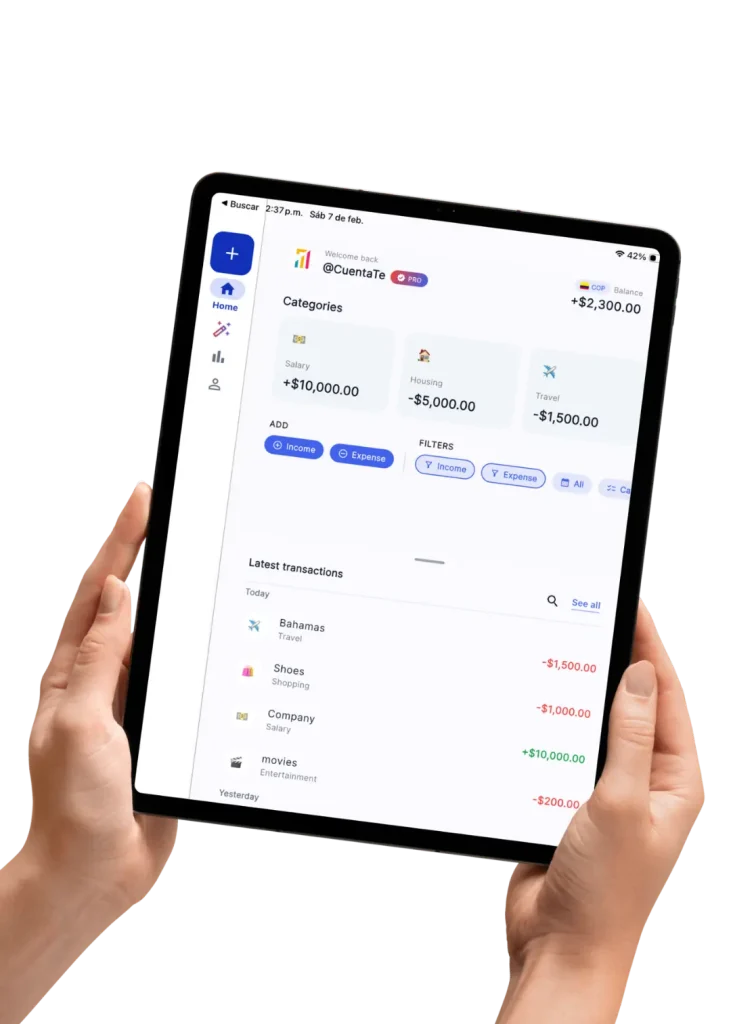
The Ultimate Personal Finance App for Phones and iPads
Experience your finances like never before with the best budgeting app optimized for the big screen. AI Money turns your tablet into a financial command center. Monitor your budget tracker in real-time, analyze detailed expense tracker charts, and make smarter data-driven decisions—all in one scroll-free view
Frequently Asked Questions
What makes AI Money the best personal finance app?
Unlike standard apps, AI Money features Denis, an advanced AI finance assistant. You can log expenses via WhatsApp, voice notes, or photos with zero manual entry, giving you real-time control over your wealth. The application was created by accountants who understand your needs.
How does the WhatsApp expense tracker work?
It is incredibly easy. You simply send a text or audio message to your AI assistant via WhatsApp. The AI instantly categorizes the transaction and updates your budgeting app dashboard on autopilot.
Is this AI budget tracker completely free?
Yes! AI Money offers the most comprehensive FREE plan on the market. You get unlimited transactions, custom financial reports, and smart categorization at zero cost, with optional premium reasoning models available.
Is my financial data safe with the AI assistant?
Your transactions live in a local database on your own phone, and AI Money never asks for a bank login or a card number — so there are no banking credentials in the app to steal. Anything that does travel to our servers goes over an encrypted connection, and optional cloud backups are stored on Google Firebase, encrypted at rest. The AI assistant is the part that sends data out: your question, your name and the transactions in the range you selected go to our servers and on to OpenAI to produce an answer. It is not anonymized, and there is no on-device AI.
Can I scan receipts with this expense tracker app?
Yes! AI Money features a smart photo scanner. Just snap a picture of your bill or receipt, and the AI will extract the data to update your budget tracker automatically.
Can I use the app on my iPad and export my data?
Yes — AI Money runs on iPhone, iPad and Android, with a layout built for the bigger screen. With Pro, AI Money Cloud automatically backs up and syncs your last two years of transactions to every device where you sign in; older entries stay on the device that created them. On the free plan your data stays on your device and you move it with a free backup file. Exports to Excel, PDF and CSV are free for the last 7 days or the current month, and Pro unlocks the full year and any custom date range.
Do I have to connect my bank account or use Plaid to use AI Money?
No. AI Money never connects to a bank — there is no Plaid, no open banking, and no bank password, card number or login to hand over. You add the accounts you already have as names and balances, and the app keeps the record while your bank keeps the money. Instead of a bank feed, spending is captured as it happens: from a WhatsApp message, a voice note or a photo of the receipt on any plan, and with Pro from Android bank-SMS alerts, Google Pay notifications or an Apple Pay Shortcut on iPhone.
Can AI Money read my bank SMS alerts and log the expense for me?
On Android, yes, with a Pro subscription. You whitelist your bank’s sender IDs and grant SMS permission, and AI Money reads only those senders: the alert text is sent to our servers and on to OpenAI, which pulls out the amount, merchant and card — along with anything else your bank wrote in that message. It never logs into your bank and reads nothing outside the senders you chose. It works with banks that text you transaction alerts, which is common across Latin America and Asia and rarer in the US. iPhones can’t read SMS, so iOS uses an Apple Pay Shortcut instead.
How do I set up the WhatsApp expense tracker?
Open Settings in the app, choose WhatsApp, and you get a six-character code that is valid for five minutes; send that code to the AI Money bot from the number you want to link — sending it from that phone is what verifies it. After that, just message the bot: type “lunch 12”, send a voice note, or photograph a receipt. What you send goes to our servers and on to OpenAI, which extracts the amount, merchant, date and category, and the entry appears the next time you open the app. Linking is free but needs a signed-in account.
What are the free plan’s WhatsApp limits?
The free plan logs two transactions a day through the WhatsApp bot, counted in your own timezone, and Pro removes that limit. Free also caps voice notes sent to the bot at 30 seconds and the total messages it will process at 60 a day. Linking your number costs nothing and does not require Pro, and inside the app the free plan keeps manual transactions, categories and budgets unlimited — the cap applies only to what the bot logs for you.
Can I record an expense by voice, just by saying what I spent?
Yes — say something like “twelve dollars on coffee” and AI Money turns it into a categorized transaction. The two ways of doing it differ, and the difference matters: with the microphone inside the app, your phone’s own iOS or Android speech recognizer converts the audio to text and only that text is sent on, so the recording never leaves your device. A voice note sent to the WhatsApp bot does travel — through WhatsApp to our servers and on to OpenAI, which transcribes it. Voice works in English, Spanish, Portuguese and Japanese.
Can my iPhone log Apple Pay purchases automatically?
Yes, with Pro and a one-time setup. You install the “Save Transaction to AI Money” Apple Shortcut and add a Wallet automation, so each Apple Pay purchase passes the amount and the card used into the app, where the merchant name is categorized. It is not a bank connection — the payment details come from Wallet on your own phone. Because it runs on Apple’s Shortcuts automation, an entry can occasionally wait until you next open the app, and payments that arrive without a merchant name are saved as “Apple Pay” for you to rename.
Is the free plan a free trial that starts charging me later?
No — the free plan is a permanent tier, not a countdown. There is no card to enter and it does not expire. It includes unlimited manual transactions, unlimited categories and unlimited budgets, your full history, up to three savings pockets and three debts, and exports to Excel, PDF and CSV for the last 7 days or the current month. It is ad-supported. Pro is a separate auto-renewing monthly or annual subscription billed by the App Store or Google Play and cancellable there at any time.
Is AI Money a free alternative to YNAB, Mint or Monarch Money?
AI Money is a free-tier alternative that takes the opposite approach to a bank feed: it never links to your bank, so there is no Plaid connection, no bank password and no aggregator to break — and no US-only bank list, because it works from the alerts and messages you already receive. The free plan covers unlimited manual transactions, categories and budgets, accounts and transfers, three savings pockets, three debts, and Excel, PDF and CSV export for the last 7 days or the current month. The trade-offs are ads and daily capture limits.
Does AI Money work offline, and do I need to create an account?
Yes — the core of AI Money works with no connection at all, and you can start using it without creating an account. Transactions, accounts, budgets, savings pockets, debts, charts and exports all live in a local database on your phone. What needs internet is anything AI — the chat assistant, voice and receipt extraction, SMS and Apple Pay capture — plus the WhatsApp bot, cloud backup and fresh exchange rates. As a guest there is no cloud backup, so your data stays on that one device until you sign in.
Can I track expenses in more than one currency?
Yes — in AI Money each account holds its own currency, chosen when you create it, and every transaction is stored in that currency, with exchange rates updated daily. If you paid in a different currency, the original amount is kept alongside. Your main currency acts as a lens: one switch converts every screen into it, although changing your main currency does not reconvert past entries. The free plan covers your main currency and your home country’s; foreign-currency accounts and secondary-currency views are Pro.
What actually leaves my phone when I use an AI feature?
Only what you ask it to read. A receipt photo, a voice transcript, a whitelisted bank SMS or a WhatsApp message travels over an encrypted connection to our servers and on to OpenAI, which extracts the amount, merchant and date and sends back the transaction. AI Money does not keep the photo or build a receipt archive — what it stores is the entry. Your ledger itself lives in a local database on your phone; the exceptions are entries logged through WhatsApp, which are created on our servers first, and optional Pro cloud backup.
How does the shared space for couples work?
You create a shared space, invite your partner, and the two of you fund a common pot that pays for what you share — rent, groceries, the bills. Both of you see the pot’s balance, every movement in it and how much each of you has put in. It is a shared record, not a joint bank account: AI Money never holds or moves real money, and a space is for two people. It needs Pro.
Will my partner see my personal accounts and transactions?
No. Only the shared pot crosses over — its balance, and for each movement the amount, the date, a title and who made it. Your own accounts, your balances and every transaction you did not put in the pot stay on your phone and are never sent to the space, including the account a contribution came out of. That is the whole design: you share what you decide to share, and nothing else.
How much does AI Money Pro cost?
Pro is $3.99 a month or $32.99 a year on the US App Store, billed by the store and cancellable there at any time; other countries see their local price. Pro removes ads and unlocks automatic capture from bank SMS and Apple Pay, unlimited WhatsApp logging, cloud backup and sync, unlimited savings pockets and debts, foreign-currency accounts, and exports for any date range. The free plan stays free, with no card required.
What happens to my data if I stop paying for Pro?
Nothing is deleted from your phone. Your transactions, accounts, budgets, savings pockets and debts live in a local database and stay exactly as they are — you simply go back to the free plan’s limits and ads, and can’t create new pockets or debts past three. Cloud sync pauses, and the copy held in the cloud is kept for around six months before it is removed. Anything logged through WhatsApp is preserved.
How do I delete my account and everything in it?
You can delete your account from Settings inside the app, and there is also a deletion page on this site. Deleting removes your profile and what we hold on our servers, including cloud backups. The ledger on your phone belongs to the app, so export a backup file first if you want to keep a copy of your history. Deleting the account does not cancel a subscription — do that in the App Store or Google Play.