 Skip to content
AI Money on iPad: expense tracker and budget app for the big screen
The same free app as on iPhone, with a layout that uses the whole tablet screen.
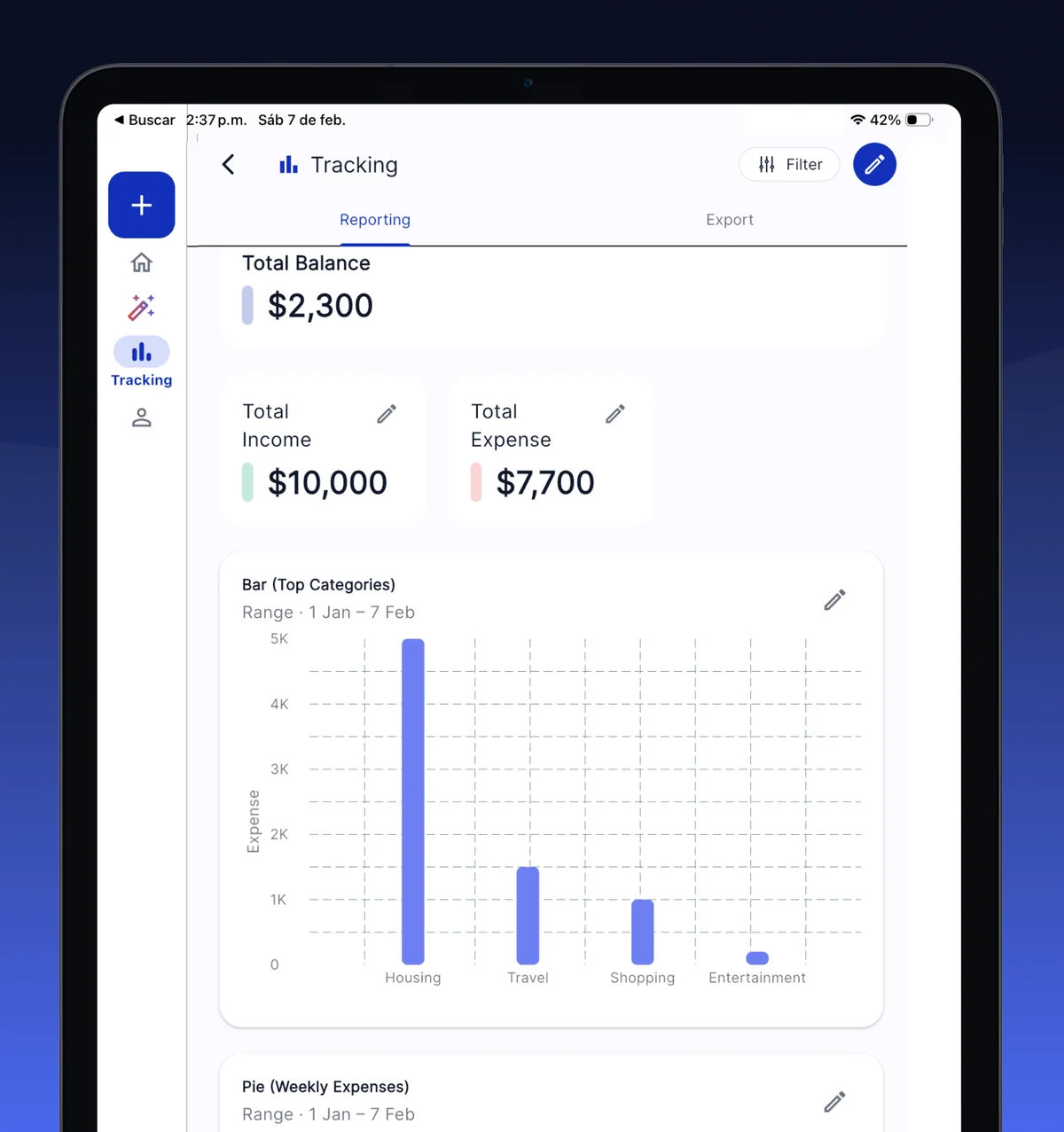
AI Money is a free personal finance and expense tracker app that runs natively on iPad, with a layout built for the big screen. It is the same universal app you install on iPhone, so there is nothing extra to buy: on iPad the bottom tabs become a side navigation rail, the transaction list gets a filter panel next to it, and reports draw their charts across the full width of the screen. You log expenses by typing, dictating, photographing a receipt with the iPad camera or sending a WhatsApp message, and budgets, savings pockets, debts and exports to Excel, CSV and PDF all work exactly as on the phone. It needs iPadOS 13 or later, works in portrait and landscape, and the free plan has no time limit.
Is there an AI Money app for iPad?
Yes. AI Money is published on the App Store as a universal app, which means the download you see on an iPad is the real iPad version and not an iPhone app stretched to fit. It supports every iPad that can run iPadOS 13 or later: iPad, iPad mini, iPad Air and iPad Pro, in any generation still receiving that system. You can hold it in portrait or landscape, and it accepts Split View and Slide Over, so you can keep a bank statement or a spreadsheet open on one side while you enter the month’s movements on the other.
Because it is one app and one account, your data is not tied to a device. Sign in on the iPad with the same account you use on your phone and, with AI Money Cloud turned on, both screens show the same ledger.
What changes in the app when you open it on an iPad?
The screen is not just bigger, it is used differently. When the window is wider than a phone, AI Money switches its layout in four places.
| Area | On iPhone | On iPad |
|---|---|---|
| Navigation | Tab bar at the bottom | Navigation rail on the left, with the add button on top, always in reach of your thumb |
| Content | One full-width column | A centred column of up to 900 points, so tables and lists do not stretch into unreadable lines |
| Transactions | Filters in a sheet that covers the list | Filters and search in a side panel, next to the list, so you filter and read at the same time |
| Reports | Charts stacked vertically | Bar and pie charts drawn wide, with the whole period visible without scrolling |
Denis, the assistant, also benefits from the room. Its answers about your own numbers come as selectable text on a wide canvas, which makes it comfortable to ask a question, read the reply and copy a figure into another app without leaving the screen.
How do you log an expense from the iPad?
Every route that exists on the phone exists on the iPad, minus the two that depend on phone hardware.
- Tap the + button at the top of the rail and type the movement by hand. Unlimited on the free plan.
- Tap the microphone and dictate it. “Groceries 84.20 at Trader Joe’s” comes back with amount, merchant and category filled in.
- Choose Scan AI and photograph the receipt with the iPad camera, or pick a photo you already have. The receipt scanner reads the total, the merchant and the date.
- Send a message, a voice note or a photo to the WhatsApp bot from your phone. Once your number is linked, those entries show up in the app on the iPad too, as long as you are signed in with the same account.
What the iPad cannot do is read bank alert SMS, which is an Android feature, or capture Apple Pay purchases through a Shortcut, which needs an iPhone. If you rely on those, the sensible setup is to let the phone catch the automatic entries and use the iPad to review, budget and export.
Does it sync between iPhone and iPad?
It can, and you choose whether it does. Out of the box your movements live in a local database on the device, and nothing is copied to a server. AI Money Cloud, which is part of Pro, is a switch in Settings: turn it on and every movement, account, budget and savings pocket is backed up and mirrored on every device signed in with your account, with the last two years of history travelling to the new device. Edit an expense on the iPad and it changes on the iPhone.
On the free plan you still have two ways to bring your history to the iPad. The app can save a backup file, which you export from the phone and import on the tablet, and on Apple devices it can keep a copy in iCloud that you restore from the tablet in one tap. Both are full copies, movements and categories and pockets included, and importing merges with what is already there instead of replacing it.
What can you do for free on iPad?
The free plan is the same on every platform and it does not expire.
| Feature | Free plan | Pro |
|---|---|---|
| Manual transactions, categories and budgets | Unlimited | Unlimited |
| Dictation inside the app | Included | Included |
| Receipt scans inside the app | 2 a month | 10 a day |
| WhatsApp entries | 2 a day, 10 images a day | Caps removed |
| Reports, charts and export to Excel, CSV and PDF | Included | Included |
| Savings pockets, debts and subscriptions | Included | Included |
| Backup file and iCloud copy | Included | Included |
| AI Money Cloud sync between iPhone, iPad and Mac | No | Yes |
There is no card to enter, no trial that expires and no bank to connect. Expenses come in because you type, dictate, photograph or send them, which also means cash gets recorded and it works with any bank in any country.
Does it work on Mac as well?
The same App Store download runs on Macs with Apple silicon on macOS 11 or later, where the rail becomes a proper sidebar and the pages fill the window. With AI Money Cloud on, iPhone, iPad and Mac share one ledger. There are also home screen widgets for balance, budget and recent expenses, which on iPad sit on the home screen just as they do on the phone.
Frequently asked questions about AI Money on iPad
Yes. The free plan is the same on iPad as on iPhone and Android: unlimited manual transactions, categories and budgets, dictation, 2 receipt scans a month, reports and export to Excel, CSV and PDF, with no card and no trial that expires. Pro removes the scan and WhatsApp caps and adds AI Money Cloud sync between devices.
Any iPad running iPadOS 13 or later, which covers iPad, iPad mini, iPad Air and iPad Pro across the generations that still receive that system. It is a universal app, so you install it from the App Store on the iPad itself and it opens in its tablet layout, in portrait or landscape.
With AI Money Cloud, which is part of Pro and is a switch in Settings, movements, accounts, budgets and savings pockets are mirrored on every device signed in with your account. On the free plan you can move your history with a backup file or, on Apple devices, with the iCloud copy the app keeps, and importing merges with what is already on the iPad.
Yes. Tap +, choose Scan AI and photograph the ticket, or pick a photo from the gallery. The scanner reads the total, the merchant and the date and files the expense in your own category. The free plan includes 2 scans a month inside the app; Pro raises it to 10 a day.
Yes, provided the iPad is signed in with the same account whose number is linked to the bot. Messages, voice notes and receipt photos you send from your phone are logged with category and date and appear in the app on the iPad as well. The bot itself is used from the phone, because WhatsApp is tied to a phone number.
No, and it never asks for online banking credentials. Expenses arrive because you type, dictate, photograph or send them, so cash gets recorded too and it works with any bank in any country. Automatic bank SMS reading exists only on Android, and Apple Pay capture through a Shortcut only on iPhone.
Keep reading
- Every AI Money feature, explained
- Track expenses on WhatsApp, step by step
- How the receipt scanner turns a photo into an expense
- Best budgeting apps, with verified prices
- Free financial calculators, no sign-up
- AI Money on the App Store
 AI Money
AI expense tracking
AI Money
AI expense tracking
Start free, in under a minute
- Free forever
- No card
- Your data stays on your device

